Building an enterprise-grade nested lab for VMware Cloud Foundation (VCF) used to require days of manual OVA deployments, network plumbing, and tedious JSON validation. Broadcom’s Holodeck Toolkit (v9.1) has completely changed the game by automating the provisioning of standard nested Cloud Foundation architectures on a single physical ESXi host.
During my recent lab deployment using the Holodeck framework, I hit a classic roadblock that many lab runners face: nested provisioning latency triggering PowerCLI HTTP timeout exceptions.
Here is a quick walkthrough of the deployment process and the exact command needed to prevent Cloud Builder provisioning routines from failing.
The Architecture: Why Holodeck?
Holodeck is an automated nested provisioning framework created by VMware/Broadcom architects. It allows you to build a complete, self-contained VCF pod—including:
- Virtual Routers (VyOS / Cloud Gateway)
- Active Directory, DNS, and NTP infrastructure
- Nested ESXi nodes configured for vSAN
- VMware Cloud Builder appliance pre-configured for Day 0 Bring-up
By following the official Holodeck 9.1 Documentation, the deployment scripts automatically configure network port groups, nested virtual switches, and drive the initial bootstrap phases via PowerShell and PowerCLI.
The Roadblock: The 300-Second Web Operation Timeout
During the deployment orchestrator execution, the PowerShell automation pushes heavy payloads and polls the nested environment (particularly Cloud Builder and nested vCenter services).
Because lab hardware (storage IOPS, nested CPU scheduling) does not match production enterprise performance, API responses can experience temporary latency. By default, VMware PowerCLI sets its internal Web/HTTP operation timeout to 300 seconds (5 minutes).
If a task takes longer than 300 seconds to return status, the script abruptly halts with an error similar to:
The operation has timed out.
At line:1 char:1
+ ... Invoke-RestMethod / PowerCLI Cmdlet ...
+ CategoryInfo          : OperationTimeout
+ FullyQualifiedErrorId : ClientSideTimeout
The Fix: Increasing the HTTP Timeout to 1800 Seconds
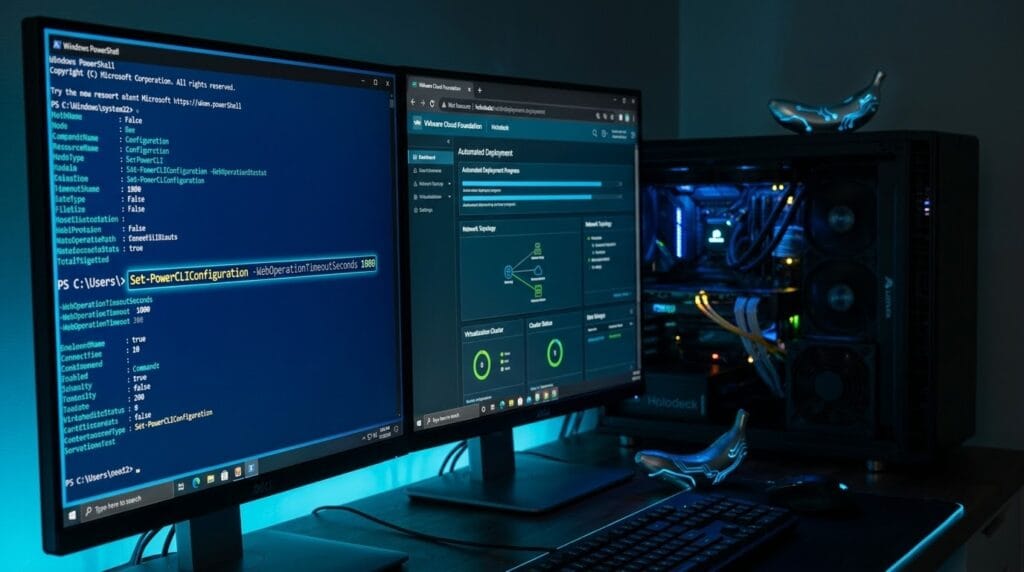
To give nested appliances sufficient headroom to process background tasks without cutting off the session, you need to adjust PowerCLI’s global configuration on the deployment VM / Holodeck PowerShell console.
Open an elevated PowerShell prompt on the Holodeck management workstation and execute:
Set-PowerCLIConfiguration -WebOperationTimeoutSeconds 1800 -Scope User -Confirm:$falseWhat this parameter does:
-WebOperationTimeoutSeconds 1800: Increases the client-side socket/HTTP timeout from the default 300 seconds to 1800 seconds (30 minutes).-Scope User: Applies the change to the active profile running the Holodeck automation scripts.-Confirm:$false: Suppresses the interactive confirmation prompt.
To verify that the new value is applied, run:
Get-PowerCLIConfiguration | Select-Object -Property Scope, WebOperationTimeoutSecondsYou should see 1800 reflected under your user configuration.
Key Takeaways for Lab Builders
Once the timeout was extended, the Holodeck automation resumed and completed the full nested bring-up process without interruptions:
- Storage Bottlenecks: Most lab timeouts are related to disk I/O when provisioning multiple nested ESXi nodes and appliances simultaneously. Always prioritize NVMe storage for the VMFS volume hosting the nested pod.
- Set Configurations Early: Apply the
Set-PowerCLIConfigurationcommand right after installing the VMware.PowerCLI module, before launching the initial deployment templates. - Patience is Key: Nested VCF bring-up takes several hours depending on your underlying compute. Allowing longer HTTP polling intervals ensures the pipeline stays alive.
If you are planning to test VCF Day 1 / Day 2 workflows or evaluate integration capabilities, Holodeck 9.1 is by far the cleanest route available. Just make sure to give PowerCLI enough time to wait for your nested appliances to respond!